 By Ethan Brooks
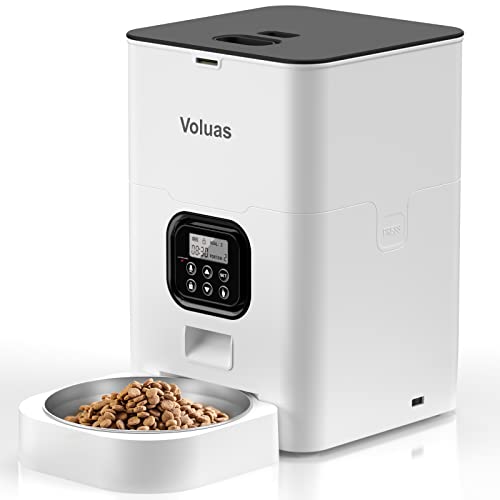
A voluas automatic pet feeder portion size chart gives you a starting point for how much food to dispense per meal, based on your pet’s body weight, age and activity level. This guide walks you through reading that kind of chart, converting cups into the grams or ounces your feeder actually measures, and adjusting portions over the first few weeks so your pet stays at a healthy weight. Use the chart as a baseline, then confirm the numbers with your veterinarian, especially for puppies, kittens, seniors or pets with medical conditions.
Why portion size matters more with an automatic feeder
When you hand-scoop food, small errors average out over time. An automatic feeder repeats the same dispense every time, so a setting that is 10 percent too high becomes 10 percent too high at every meal, every day. Pet food labels usually give feeding guidance in cups or grams per day, but many dispensers measure by portion count or by volume per cycle, so you need to translate between the two before you program anything.
Overfeeding is the more common problem with timed dispensers, mostly because owners set a portion that looks reasonable in the scoop and then never revisit it. Underfeeding can happen too, especially when a pet is working harder or the feeder jams partway through a cycle. A chart helps you catch both.
Step 1: Gather the information the chart asks for
Before you look at any table, collect these details:
- Current body weight in pounds or kilograms, weighed on a bathroom or kitchen scale (weigh yourself, then weigh yourself holding the pet, and subtract).
- Age stage: puppy or kitten, adult, or senior.
- Activity level: mostly indoors, moderate daily walks or play, or high activity such as working or agility.
- Whether the pet is spayed or neutered, since this affects energy needs.
- The calorie content of the food you plan to use, usually listed as kcal per cup or kcal per kilogram on the bag.
- Your feeder’s measurement unit: some dispense by cup or scoop, others by grams, and some by a fixed number of portions per cycle.
Having the calorie figure matters most. Two foods with the same cup volume can differ by 30 percent or more in calories, so a chart based on volume alone is only approximate.
Step 2: Read the chart by weight band and activity
Most portion charts are arranged in weight bands. Find the row closest to your pet’s current weight, then move across to the column for activity level. Charts from pet food makers are usually built around a daily total, which you then divide across the number of meals you plan to program.
| Body weight (lb) | Typical adult activity | Daily amount guidance (per label) | Suggested meals per day |
|---|---|---|---|
| 5 to 10 | Mostly indoor | About 1/2 to 3/4 cup of kibble, depending on kcal density | 2 |
| 20 to 30 | Moderate daily walks | About 1 to 1 1/2 cups | 2 |
| 50 to 70 | Moderate to high activity | About 2 to 3 cups | 2 |
| 80 and over | Working or high activity | Often 3 to 4+ cups; confirm with a vet | 2 to 3 |
These ranges are illustrative only. Always start from the exact figures printed on your food bag or from your veterinarian’s recommendation, because kibble calorie density varies widely between brands.
Step 3: Convert the chart into your feeder’s units
Once you have a daily total, convert it to what the feeder measures. Here is a simple method:
- Write down the daily total in cups (or grams).
- Divide by the number of meals you will schedule. Two meals a day is the most common setup.
- If the feeder uses portion counts, check the manufacturer’s manual for how many cups or grams one portion equals. Do not assume; test it.
- Run a test dispense into a measuring cup or kitchen scale and compare the actual weight to your target. Repeat three times to check consistency.
- Program the first meal, leaving a small margin for kibble that sticks in the chute.
Measuring food by weight instead of volume
Kibble density varies, so a cup of one food can weigh noticeably more than a cup of another. If your feeder allows gram settings, use the grams listed on the label or your own scale readings. Weighing a few test batches gives you a reliable conversion for that specific food.
Adjusting for wet food and mixed diets
Wet food is mostly water, so it takes a much larger volume to deliver the same calories. If you combine wet and dry, calculate the calories from each and subtract the wet portion from the daily target before setting the dry dispense. Many owners skip this step and end up with pets that gain weight over a few months.
Step 4: Build your schedule and test it
Program two meals a day spaced roughly 10 to 12 hours apart as a starting point, unless your veterinarian advises otherwise. Run the schedule for one to two weeks, then reweigh your pet. Check body condition too: you should feel ribs with light pressure without seeing them, and there should be a visible waist when viewed from above.
Adjust in small steps, around 5 to 10 percent at a time. Big changes can upset digestion, and it is hard to tell what worked if you change several things at once.
Common mistakes to avoid
- Trusting the scoop, not the scale. Test the dispense by weight; cup and scoop sizes vary.
- Ignoring treats. Treats count toward daily calories. Subtract them from the feeder total.
- Setting one portion for a growing pet. Puppies and kittens need their portions revised every few weeks as they grow.
- Forgetting seasonal activity changes. A dog that walks less in winter may need less food.
- Leaving food in the hopper for too long. Kibble stored in the feeder for days can lose freshness, and humid environments can cause clumping that affects dispensing.
- Not rechecking after a feeder fault. If a jam caused an empty or double dispense, check the bowl and the next meal before assuming all is well.
Tips for accurate, safe portions
- Keep the chart and your calculations in one place, with the date and your pet’s weight.
- Weigh your pet monthly, using the same scale and time of day.
- Use a dedicated feeding bowl that fits the dispense volume so food does not spill or pile up.
- If your pet has a medical condition, such as diabetes, kidney disease or pancreatitis, get a veterinary plan before using any automatic schedule.
- Check the batteries or backup power on a regular schedule so a power cut does not change the timing unexpectedly.
Recommended gear
A few supporting items make portion control easier to maintain day to day.
- Digital kitchen scale to verify dispense weights and convert cups to grams for your specific food. View on Amazon
- Measuring cup set with metric and imperial markings for checking test dispenses and hand-topping meals. View on Amazon
- Bathroom or pet scale for monthly weigh-ins, which is the simplest way to catch slow weight gain. View on Amazon
- Slow feeder bowl if the pet eats too fast, which can cause a portion that looks too small to feel filling. View on Amazon
FAQ
Is the voluas automatic pet feeder portion size chart accurate for every pet?
No chart is accurate for every pet. It gives a baseline based on weight, age and activity. Your pet’s body condition, metabolism and food calories will shift the right amount, so adjust from there and check with your veterinarian.
How often should I update the portion settings?
Reweigh your pet monthly and review the settings at least every four to six weeks. Puppies and kittens may need updates more often because they are growing quickly.
Should I use cups or grams on my feeder?
Grams are more consistent because kibble density varies. If the feeder only uses cups, test a few dispenses on a kitchen scale and note the weight so you can convert accurately.
How many meals should I program per day?
Two meals a day is the most common schedule for adult dogs and cats. Some pets do better with three smaller meals, and some medical conditions call for a specific schedule, so follow your vet’s advice.
What if my pet is still hungry after the feeder runs?
First check that the feeder actually dispensed the full portion and that nothing jammed. If the pet is consistently hungry and at a healthy weight, discuss the amount with your veterinarian before increasing it, since hunger can have several causes.
Does wet food change the portion chart?
Yes. Wet food has far fewer calories per gram than dry kibble, so you need to calculate the calories from each food and reduce the dry portion accordingly.
Can I use the chart for a kitten or puppy?
Young pets need specific feeding guidance based on their expected adult weight and growth stage. Use a growth-specific chart or ask your veterinarian for a plan, and update it as your pet grows.
What should I do if the feeder dispenses the wrong amount?
Stop the schedule, clear any jammed food, and run a weighed test dispense. If results vary, check the feeder manual for cleaning and calibration steps, and see our troubleshooting guide for common causes.
Conclusion
A voluas automatic pet feeder portion size chart works best as a starting point: match your pet’s weight, age and activity to the right band, convert the daily total into your feeder’s units, and test the dispense by weight. Recheck every few weeks and adjust in small steps. When in doubt, a quick call to your veterinarian will settle the numbers for your specific pet.
Related reading
- Automatic Pet Feeders: Timers, Portions and Backup Power
- How to Evaluate Automatic Feeders and Pet Fountains
- Best Automatic Pet Feeders With Timers
- Automatic Pet Feeder Not Dispensing Right? Troubleshooting
- Pet Feeding Mats and Portion Tools
- Vacuums for Pet Hair: Brush Rolls, Filters and Attachments
Ready to choose one?
About Ethan Brooks
Ethan Brooks is part of our editorial team and reviews and edits our everyday pet gear guides, checking product details against manufacturer specifications and owner feedback.