 By Ethan Brooks
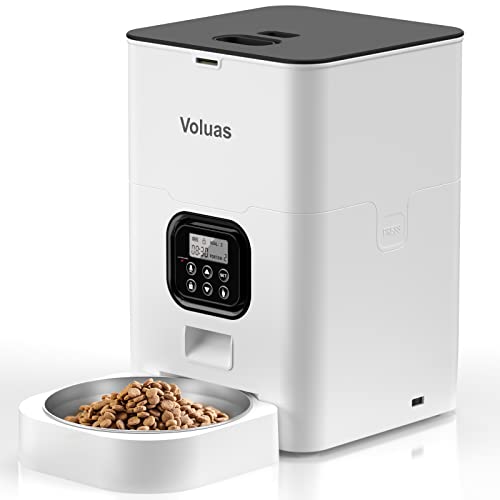
The petlibro air automatic pet feeder is a Wi-Fi-connected, app-controlled dry food dispenser aimed at owners who want scheduled meals without being home at feeding time. It suits people with one or two cats or small-to-medium dogs eating kibble, households with a regular daytime absence, and owners who like tracking portions from a phone. It is a weaker fit for wet food, raw diets, pets that need a precise medical feeding schedule, or anyone whose home Wi-Fi is unreliable. Read the specifications and owner-reported patterns below before deciding, and confirm details against the current manufacturer listing, since model revisions change over time.
Product Overview
The Air is part of PetLibro’s line of automatic feeders, a category that includes timer-only units and app-connected models. Its core job is simple: store dry kibble in a sealed hopper and release measured portions at times you set. Owners typically pair it with a phone app for scheduling, portion adjustments and feeding notifications, and most setups are used indoors on a level counter or floor near an outlet.
Compared with a basic mechanical timer feeder, the Air’s appeal is remote control. You can check whether a meal was dispensed, change the schedule while away, and in many cases add a manual feed from your phone. That convenience comes with dependencies: a working Wi-Fi connection, a charged or powered unit, and a phone that stays paired. Anyone evaluating an automatic feeder should understand the broader tradeoffs covered in How to Evaluate Automatic Feeders and Pet Fountains before committing.
The feeder is best understood as a routine-maintaining tool rather than a replacement for attention. It keeps meals on time and portions consistent, but it does not monitor how much your pet actually eats, and it cannot tell you if a pet has stopped eating altogether unless you notice the bowl is full.
Key Features & Specifications
The table below lists the characteristics manufacturers and listings commonly describe for this model family. Verify exact capacity, dimensions and power options on the product page you are buying, because accessory bundles and revisions can differ.
| Feature | What It Means in Daily Use |
|---|---|
| Food type | Dry kibble only; not designed for wet or fresh food |
| Connectivity | Wi-Fi with a companion smartphone app for scheduling and alerts |
| Portion control | Programmable portion sizes across multiple daily meals |
| Food hopper | Sealed storage container that helps limit moisture and pests |
| Power | Mains power via adapter, with battery backup options on some configurations |
| Setup | Requires an app account and network pairing during first use |
| Placement | Stable, level surface close to an outlet and within Wi-Fi range |
Before buying, check the stated hopper capacity against your pet’s daily intake. A common approach is to divide the bag’s feeding guideline by the number of meals you plan, then confirm the hopper holds several days of food for your routine. Capacity claims vary by kibble density, so treat the listed figure as approximate.
Pros & Cons
Pros
- Remote scheduling and portion changes from a phone, useful for workdays and weekend trips.
- Sealed hopper design helps keep kibble fresher than an open bowl left out for hours.
- Multiple daily meals can be set, which suits pets on split feeding schedules.
- Manual feeding from the app lets you give a meal early if a schedule is delayed.
- Works well with standard dry kibble without special adapters.
Cons
- Not suitable for wet food, fresh food or mixed diets that need a moist component.
- Depends on Wi-Fi and the app; connection drops can disrupt schedules.
- Kibble with irregular shapes or dust can occasionally jam the dispensing mechanism.
- Requires a bowl or mat to be cleaned regularly to prevent residue buildup.
- Owners who prefer a simple, offline device may find the app setup more involved than they want.
Performance Analysis
Performance for an automatic feeder comes down to three things: whether meals are dispensed on time, whether portions are consistent, and whether the food stays protected. Based on manufacturer specifications and the patterns owners commonly discuss in reviews, the Air performs most reliably when the kibble is uniform and the unit sits on a stable surface.
Scheduling accuracy is generally a strength. Owners usually report that meals arrive at the programmed times, and the app’s notifications help confirm this. The weak point reported most often is connectivity. If the feeder loses Wi-Fi, scheduled meals can still run if the device stores its program locally, but changes made remotely may not apply until the connection returns. Owners should test a few days with the app open before relying on it for an unattended trip.
Portion consistency depends on kibble shape and size. Small, uniform pellets tend to dispense cleanly. Larger, oddly shaped pieces or crumbled food can clog the chute, and some owners describe needing to clear a jam by hand. Switching to a more regular kibble or removing dust from the hopper often resolves this. For a fuller list of causes and fixes, see Automatic Pet Feeder Not Dispensing Right? Troubleshooting.
Food protection is a practical advantage. The sealed hopper limits exposure to air and humidity, which helps dry food stay palatable for longer than an open dish, though it does not replace proper storage of the bulk bag. Keep the hopper dry and avoid topping off with stale food.
Who Should Buy This Product?
The Air fits owners who want to automate dry-food meals and keep an eye on feeding remotely. It makes sense for households where someone works long hours, for multi-meal schedules that are hard to maintain by hand, and for people who value a record of when meals were dispensed.
Skip it if your pet eats wet food, raw food or prescription diets that need precise handling, or if your home has weak Wi-Fi. Owners who want a no-electronics, purely timed device may prefer a simpler mechanical unit. Households with several pets and different diets should first read Multi-Pet Household Setup: Feeding, Litter and Space to plan separate feeding areas.
If your pet has a medical condition that affects appetite or requires monitored intake, consult your veterinarian before relying on any automatic feeder, since it cannot confirm how much was eaten.
Buying Guide
Start with your pet’s routine. Count the meals per day, the portion per meal, and the number of days you may be away. Choose a hopper size that covers your longest typical absence, and remember that a full hopper is heavier and may need a firmer surface.
Check the connectivity setup. Confirm your router is within range of the placement spot and that you can create the app account before the feeder arrives. Look for a model with a sealed lid and a bowl that is easy to remove for washing. Dishwasher-safe bowls save time, and Pet Bowls: Stainless Steel vs Ceramic vs Plastic explains how bowl material affects cleaning and odor.
Consider power backup. A mains-only unit stops if the outlet loses power; a model with battery backup keeps scheduled meals running during brief outages. Compare how each option handles interruptions before choosing.
If the Air does not fit your needs, consider these well-known alternatives. The PetSafe Smart Feed 2.0 is a Wi-Fi feeder with app-based scheduling and a large hopper, suited to owners who want similar remote control. View on Amazon The Petmate Programmable Pet Feeder is a timer-based option that works without an app, appealing to owners who prefer a simpler setup. View on Amazon The Hopper Mini-Style Dual Feeder style of gravity-fed bowls is a lower-tech alternative for owners who only need food stored and available, not scheduled. View on Amazon
For a broader comparison of timers, portions and backup power, read Best Automatic Pet Feeders With Timers and Automatic Pet Feeders: Timers, Portions and Backup Power.
FAQ
Does the petlibro air automatic pet feeder work with wet food?
No. It is designed for dry kibble. Wet or fresh food can spoil in the hopper and may clog the dispensing mechanism, so keep it to dry food.
Can I feed my pet remotely with this feeder?
Owners typically use the companion app to trigger a manual meal when the feeder is connected to Wi-Fi. Confirm the manual-feed function on your specific model before relying on it.
What happens if the Wi-Fi goes down?
Previously set schedules generally continue, but remote changes and notifications may not work until the connection returns. Test this at home before an extended trip.
Why is my feeder jamming?
Jams are most often caused by irregular kibble shapes, dust or crumbs, or a hopper that is overfilled. Clean the chute, switch to more uniform kibble and avoid filling beyond the marked line.
Is it safe to leave dry food in the hopper for several days?
The sealed design helps protect food, but dry food should still be refreshed regularly and kept away from heat and humidity. Avoid mixing fresh food into the hopper.
Can I use the feeder with more than one pet?
It can serve multiple pets, but it dispenses to one bowl. Separate feeders are usually better if pets eat different diets or need controlled portions.
Does the feeder tell me how much my pet actually ate?
No. It confirms that food was dispensed, not that it was eaten. Monitor bowl levels and your pet’s weight and body condition, and consult your veterinarian about any change in appetite.
Final Verdict
The petlibro air automatic pet feeder is a sensible choice for owners who want reliable, app-managed dry-food meals and a sealed hopper that keeps kibble protected between servings. Its strengths are remote scheduling, portion control and a straightforward daily routine. Its limits are dry food only, reliance on Wi-Fi, and the need to keep kibble uniform to avoid jams. If that matches your household, it is worth a closer look. If you feed wet food or need monitored intake, look elsewhere. View on Amazon
About Ethan Brooks
Ethan Brooks is part of our editorial team and reviews and edits our everyday pet gear guides, checking product details against manufacturer specifications and owner feedback.