 By Ethan Brooks
Updated November 2026
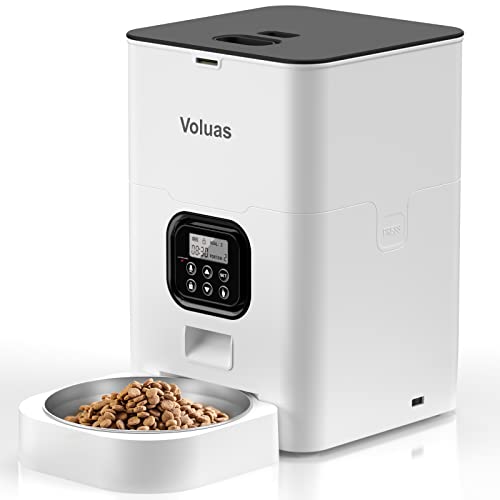
When a Voluas automatic pet feeder not working problem shows up, the cause is usually simple: a power interruption, a clogged food chute, a schedule that was never saved, or a Wi-Fi link that dropped. This guide walks you through the checks in the order that solves the most problems fastest, so you can get meals dispensing on time again. You will also learn when the issue is more likely a hardware fault and it is time to contact support.
Start With a Quick Diagnosis
Before you open the lid or start resetting anything, spend two minutes figuring out what the feeder is actually doing. Watch the display and indicator lights, and note whether the motor makes any sound when a feeding should happen. That single observation narrows the problem considerably.
- Dead display, no lights: The unit has no power. Check the adapter, the outlet and any battery backup.
- Lights on, no sound at feeding time: The schedule, portion setting or motor circuit is the likely culprit.
- Motor runs but no food comes out: A blockage in the hopper, auger or chute.
- Feeds at the wrong times or not at all after a power cut: Clock and schedule settings were reset.
- Phone app shows offline or commands fail: A Wi-Fi or account pairing issue, not a feeding fault.
Once you know which group your symptom falls into, move to the matching section below.
Check Power and Connections
A surprising number of “not working” reports come down to power. Automatic feeders draw more current when the motor starts, and a loose adapter or a power strip that has been switched off can make the unit look dead or cause it to reboot mid-cycle.
Step-by-step power check
- Unplug the DC adapter from the feeder and from the wall, then plug it back in firmly.
- Plug the adapter directly into a wall outlet. Avoid daisy-chained power strips, especially ones with surge protection that may have tripped.
- Confirm the outlet works by plugging in a lamp or phone charger.
- If your model has battery backup, check that the batteries are installed correctly and are not depleted. Replace them with fresh ones of the type the manual specifies.
- Look at the power indicator. A steady light means power is present; no light means look at the adapter and outlet again.
Check the adapter and cable
Inspect the cable for kinks, cuts or a plug that feels warm. A damaged adapter can power the display intermittently while failing to supply enough current for the motor. Use only the adapter that came with the unit or one that matches the voltage and polarity printed on the label. If the cable looks damaged, stop using it and replace it.
Fix Feeding Schedule and Clock Problems
If the feeder has power but skips meals, the schedule is the next place to look. Many owners discover that a power outage reset the internal clock, which then shifted every feeding time or cancelled the entries altogether.
Verify the time and date
Open the clock setting and confirm the current time and day. If it reads 12:00 or a date from years ago, the clock has reset. Set it correctly before you change anything else, because feeding times are tied to the internal clock.
Re-check each feeding entry
- Confirm each scheduled time is set to AM or PM correctly. A mix-up here is one of the most common causes of “missed” meals.
- Make sure the feeding days are enabled. Some models let you turn individual days on or off.
- Check that the portion size is not set to zero. A zero-portion entry will look like it ran but dispense nothing.
- Save the schedule and wait for the screen to confirm. Do not unplug the unit while it is still writing changes.
Use the manual’s portion guidance as a reference when you re-enter amounts. If you are unsure how many grams or cups to program for your pet, review the Voluas Automatic Pet Feeder Portion Size Chart: How to Set Portions (2026) for a structured approach, and check with your veterinarian for your pet’s actual daily requirement.
Clear Food Jams and Blockages
When the motor runs but nothing reaches the bowl, the problem is almost always mechanical. Kibble that is too large, oily, humid or crushed into dust can jam the auger or bridge over the outlet. Pet food that has been stored in a humid kitchen is a frequent offender.
Tools you will need
- A soft, dry cloth or paper towels
- A thin plastic tool or wooden skewer for reaching into the chute (never use metal that could scratch the housing)
- A small brush or cotton swab for fine dust
- Mild dish soap and warm water, if the food residue is oily
Clearing the blockage
- Unplug the feeder completely before reaching inside.
- Empty the food container and remove any kibble that is wet, clumped or stale.
- Remove the outlet or chute cover if the manual allows it, and check for kibble wedged in the opening.
- Gently rotate the auger by hand, if accessible, to dislodge stuck pieces. Do not force it.
- Wash removable parts with mild soap, rinse well and dry them fully before reassembling.
- Reassemble, plug in and run a test feeding with a small portion.
Clean the feeder regularly so that dust and oil do not build up in the same places again. Weekly wiping of the chute and monthly washing of removable parts is a reasonable routine for most households.
Troubleshoot Wi-Fi and App Connection Issues
If your feeder is connected to a phone app and the app shows the unit as offline, the feeder may still dispense on its stored schedule while you cannot change anything remotely. Separate the two problems before you start resetting.
Common connection checks
- Confirm your router is working and that the feeder is within a reasonable range of it.
- Make sure your phone and the feeder use the 2.4 GHz band if the device does not support 5 GHz. Many smart home devices cannot join 5 GHz networks.
- Check that the Wi-Fi password has not changed since you first paired the device.
- Remove the feeder from the app and re-add it, following the pairing steps in the official manual.
- Restart the router if other devices are also having trouble.
For detailed pairing screens and reset methods, the manufacturer’s manual is the most reliable source. Locate the model-specific instructions and follow them exactly, since button sequences differ between versions.
Know When It Is a Hardware Fault
Some failures are not something you can fix at home. If the motor makes a grinding or burning smell, the unit gets hot to the touch, the display flickers constantly after a full power check, or water has entered the housing, stop using it. Unplug the feeder and contact the manufacturer or the retailer for warranty service. Do not open the motor housing or attempt electrical repairs yourself.
Also keep your pet’s safety in mind. If the feeder has failed and you have no reliable way to feed on schedule, arrange manual feedings or a sitter until the unit is fixed or replaced. A pet should never go without food because of a device failure.
Common Mistakes
- Using wet or oily food: Moisture swells kibble and causes jams. Keep food dry and sealed.
- Overfilling the hopper: Too much food can bridge over the outlet and stop the flow.
- Forgetting to reset the clock after an outage: The schedule may look correct but run at the wrong time.
- Using a power strip with a switch: An accidental switch-off looks like a dead feeder.
- Forcing a jammed auger: This can strip the gears or bend the shaft. Clear debris gently instead.
- Testing with a full portion: Run a small test first so you can confirm the mechanism works without wasting food.
Tips for Preventing Future Problems
- Store food in an airtight container in a cool, dry place.
- Check the clock and schedule every few weeks, and after any power cut.
- Keep a spare set of batteries if your model uses them for backup.
- Run a test feeding after any cleaning or food change.
- Write down your portion settings so you can restore them quickly after a reset.
If you are comparing this model with other options or planning a replacement, the Voluas Automatic Pet Feeder Review: Features and Performance covers how the unit performs in daily use. For a broader look at alternatives, see 7 Best Automatic Pet Feeder Not Workings (2026): Expert Picks. When you need the setup steps again, the Voluas Automatic Pet Feeder Manual: Setup, Programming and Fixes is a useful reference, and if your feeder is dispensing the wrong amounts, the guide on Automatic Pet Feeder Not Dispensing Right? Troubleshooting goes deeper into that specific symptom.
Recommended gear
These items help you keep the feeder running reliably and make troubleshooting easier.
- Surge-protected outlet with a dedicated plug for the feeder: Keeps the unit off shared power strips that can be switched off or overloaded. View on Amazon
- Airtight pet food storage container: Keeps kibble dry and prevents the clumping and moisture that cause jams. View on Amazon
- Soft-bristle cleaning brush set: Reaches into narrow chutes and corners to remove dust and residue without scratching plastic. View on Amazon
- Replacement AA alkaline batteries (if your model uses battery backup): Keeps the clock and schedule intact during brief outages. View on Amazon
FAQ
Why did my Voluas feeder stop working after a power outage?
Most units lose their internal clock during an outage, which can shift or cancel scheduled feedings. Reset the time and date first, then check each feeding entry. Battery backup, if your model has it, helps prevent this.
My feeder runs but no food comes out. What should I do?
This usually means a jam or a clogged chute. Unplug the unit, empty the hopper, remove any wet or stuck kibble, and clear the outlet with a plastic tool. Then run a small test feeding.
Can I use any dog or cat food in the feeder?
Use dry kibble that matches the size range the manufacturer recommends. Very large, oily, or soft food can jam the mechanism. Avoid wet food unless the manual specifically allows it.
The app says my feeder is offline. Will it still feed my pet?
In many cases the feeder keeps running its stored schedule even without a connection. However, you cannot change settings remotely until it reconnects. Check your Wi-Fi band and password, then re-pair the device.
How often should I clean the feeder?
Wipe the chute and outlet weekly and wash removable parts monthly, or sooner if food residue builds up. Always dry parts completely before reassembling.
What if the motor is humming but not turning?
This can indicate a blocked auger or a motor problem. Unplug the unit and check for debris around the auger. If the motor still hums without turning after clearing it, stop using the feeder and contact the manufacturer.
Is it safe to leave my pet on an automatic feeder schedule?
Automatic feeders are a convenience, but they should never be your only safeguard. Check the unit daily, confirm each meal dispensed, and have a backup plan for feeding if the device fails. Talk to your veterinarian about the right daily amount and feeding frequency for your pet.
Should I replace the feeder if it keeps failing?
Repeated failures after you have cleaned, reset and checked power suggest a hardware problem. Check your warranty first. If the unit is out of warranty and keeps failing, replacing it may be more practical than repeated repairs.
Conclusion
Most Voluas automatic pet feeder not working problems come down to power, the clock and schedule, a food jam, or a broken Wi-Fi link. Work through those checks in order and you will usually find the cause within a few minutes. If the feeder still fails after a full reset and cleaning, stop using it and contact the manufacturer, and make sure your pet has food in the meantime.
Ready to choose one?
About Ethan Brooks
Ethan Brooks is part of our editorial team and reviews and edits our everyday pet gear guides, checking product details against manufacturer specifications and owner feedback.