 By Ethan Brooks
If you own a WoPet automatic pet feeder and the paper manual is missing, the fastest way to get back on track is to locate the wopet automatic pet feeder manual PDF from the manufacturer or a reputable download source, then work through setup in a fixed order: unpack, power, load the food, set the clock, program meals, and run a test dispense. This guide explains how to find the right document, confirm it matches your model, and use it to set up a feeder you can trust.
Why the Right Manual Matters for Your Model
Automatic feeders often share a similar look across brands and even across model years within one brand. The button layout, the display text and the portion settings can differ enough that following the wrong instructions leads to meals that are too large, too small or skipped. Before you search, check the model number printed on the label on the underside of the base or inside the food hopper. Write it down exactly, including any letter suffix, because that is what you will match against the document.
Manufacturers commonly specify that the feeder should be set up with the included power adapter and, where applicable, backup batteries installed before programming. Skipping those steps is one of the most common reasons owners think a unit is broken when it is simply reset to factory defaults.
How to Find and Verify a WoPet Feeder Manual PDF
Start with the official source. Brands usually post manuals and quick-start guides on their support or product pages, sometimes grouped by model number. Search the site for your model first, then for the general product name if the model isn’t listed. Official files are the safest choice because they reflect the correct firmware and settings for your unit.
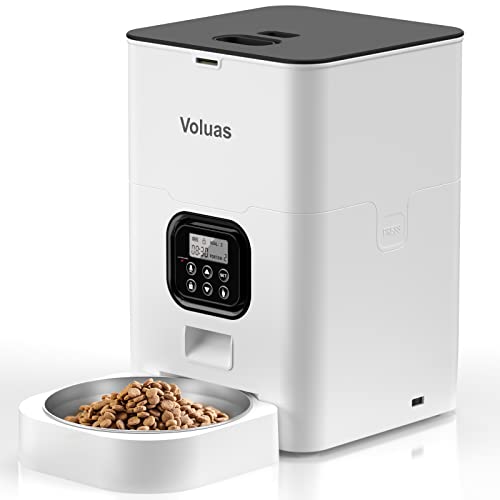
If you can’t find the file, you may see third-party sites offering a PDF. Treat those with caution. Look for a document that lists your exact model number on the cover, matches the parts shown on the page, and describes the same button and display layout as your feeder. If the diagrams don’t match what you see on your device, do not rely on that version.
- Record your model number from the label on the feeder.
- Check the manufacturer’s support pages for a manual matching that number.
- Compare the cover photo and button layout with your unit.
- Save the PDF to your phone or computer and to cloud storage so it survives a lost device.
- Note the version or revision date, if one is printed, for future reference.
Tools and Supplies You Need Before Setup
Having the right items ready keeps setup short and avoids half-finished programming sessions. Worth reading next: Wopet Automatic Pet Feeder Instructions: Step-by-Step Setup Guide.
- The model-matched manual PDF, open on a phone or tablet near the feeder
- The included AC power adapter and, if your model uses them, the backup batteries (typically AA or as specified in the manual)
- A measuring cup or kitchen scale to confirm portion sizes against the package feeding guidelines
- Your pet’s current food, as the manual may ask you to test dispense before the first real meal
- A notepad to record your meal times and portion amounts
Step-by-Step: Using the Manual to Set Up Your Feeder
Step 1: Unpack and Place the Feeder
Place the feeder on a flat, stable surface away from direct sunlight, heaters and damp areas. Keep it within reach of an outlet unless your model is designed for battery-only operation. Leave enough clearance around the bowl so your pet can eat without knocking the unit. Many owners find a non-slip mat helps keep it steady during dispensing.
Step 2: Power the Unit and Install Backup Power
Connect the power adapter, then install backup batteries if the manual calls for them. Batteries generally keep the clock and stored schedule running during a power outage, though they usually do not run the motor for long. Check the manual for the recommended battery type and whether the battery compartment should be closed before the adapter is plugged in.
Step 3: Set the Clock and Date
Use the buttons described in the manual to enter the current time, using 12-hour or 24-hour format as your model allows. An incorrect clock is the most frequent cause of meals going out at the wrong hour. Double-check the time after a power interruption, since some units reset.
Step 4: Program Meal Times and Portions
Most WoPet-style feeders let you set several daily meals, each with a time and a portion size. Portions are usually expressed as a number of dispensing units or a measured amount, depending on the model. Use the manual’s portion chart to convert your pet’s daily amount into individual meals. Divide the daily total across your chosen meal times and write each value down.
Step 5: Run a Test Dispense
Before relying on automatic feeding, run a manual dispense from the menu. Place a bowl underneath and weigh or measure what comes out. Compare the result to your target portion. If the amount is off, adjust the setting and test again. Repeat until the output matches your plan.
Step 6: Confirm the Schedule and Monitor the First Day
Review the full schedule on the display or in the menu to confirm every meal is saved. Watch the first scheduled dispense to make sure the feeder runs and your pet approaches the bowl. Keep the food level in mind, since a nearly empty hopper can cause partial or jammed dispensing.
Factors That Affect Feeding Accuracy
| Factor | What to Check | Why It Matters |
|---|---|---|
| Food size and shape | Use kibble that matches the feeder’s dispensing mechanism | Oversized or irregular pieces can jam the auger |
| Humidity | Keep food sealed and dry | Damp kibble clumps and blocks dispensing |
| Hopper level | Keep food above the minimum mark | Low levels can cause short or uneven portions |
| Power source | Adapter plus backup batteries | Outages can reset the clock or stop the schedule |
| Surface stability | Level, non-wobbling base | Vibration can shift the unit during dispensing |
For guidance on choosing portions and meal timing that fit your pet’s needs, a veterinarian is the best source, and the manual’s feeding chart should be treated as a starting point rather than a prescription.
Common Mistakes to Avoid
- Using a manual for a different model number, which leads to wrong button instructions.
- Skipping the test dispense and assuming the portion is correct.
- Forgetting to reset the clock after a power outage.
- Filling the hopper with wet or sticky food that clogs the mechanism.
- Setting the feeder on carpet or an uneven counter where it tips.
- Ignoring the low-food warning and letting the hopper run nearly empty.
Tips for Long-Term Use
- Keep the PDF saved in two places so you can reference it after a phone change.
- Clean the bowl and hopper on the schedule the manual suggests to prevent residue buildup.
- Write your programmed schedule on a card taped to the wall nearby, so anyone pet-sitting can check it.
- Recheck portions whenever your pet’s weight or activity changes.
- If you use the feeder with other pets in the home, see Multi-Pet Household Setup: Feeding, Litter and Space for ways to keep feeding areas separated.
Recommended gear
A few accessories make setup and daily use easier. A digital kitchen scale helps you verify test dispenses in grams rather than guessing. A non-slip mat keeps the feeder from shifting. A spare set of backup batteries means your schedule survives a surprise outage. Search for these with the phrases below.
- A digital kitchen scale with a tare function helps you weigh test dispenses accurately. View on Amazon
- A rubber non-slip mat keeps the feeder from walking across the floor during dispensing. View on Amazon
- Spare AA batteries for the backup compartment keep the clock and schedule running during outages. View on Amazon
FAQ
Where can I find the wopet automatic pet feeder manual PDF?
Check the manufacturer’s support or product pages first, searching by your exact model number. Official PDFs are the most reliable because they match your unit’s firmware and button layout.
How do I know the manual matches my feeder?
Compare the model number on the cover with the label on your unit, and check that the button layout and display in the diagrams match what you see. If anything differs, the version may not be correct for your model.
Do I need batteries if the feeder is plugged in?
Plugging in the adapter powers the unit, but backup batteries help keep the clock and schedule running during outages. Check the manual for the recommended battery type and whether your model uses them.
Why did my feeder dispense the wrong amount?
Common causes include the wrong portion setting, a low hopper, clumped or oversized food, or skipping the test dispense. Run a test, adjust the setting, and repeat until the output matches your target. For ongoing problems, see Automatic Pet Feeder Not Dispensing Right? Troubleshooting.
How often should I clean the feeder?
Follow the cleaning interval in the manual. Residue can build up in the hopper and mechanism, so regular cleaning helps prevent jams and keeps food fresh.
Can I use any kibble in an automatic feeder?
Choose kibble that is dry, consistently sized and fits the dispensing mechanism described in the manual. Wet or very large pieces are more likely to jam.
What should I do if the clock resets after an outage?
Reset the time and date using the buttons in the manual, then confirm your full schedule. Consider adding backup batteries if your model supports them, so this happens less often. If you want more background, see 4 Best Wopet Automatic Pet Feeder WiFi Models Compared (2026).
Should I check with my vet about feeding amounts?
Yes. The manual’s portion chart is a general starting point. A veterinarian can recommend amounts based on your pet’s age, weight, health and activity level.
Conclusion
Finding the correct wopet automatic pet feeder manual PDF for your exact model is the first step to a reliable setup. Work through power, clock, meal programming and a test dispense in order, and verify the output before trusting the schedule. Keep the manual saved, recheck portions as your pet changes, and revisit the document whenever something seems off.
Related reading
Ready to choose one?
About Ethan Brooks
Ethan Brooks is part of our editorial team and reviews and edits our everyday pet gear guides, checking product details against manufacturer specifications and owner feedback.