 By Ethan Brooks
Updated November 2026
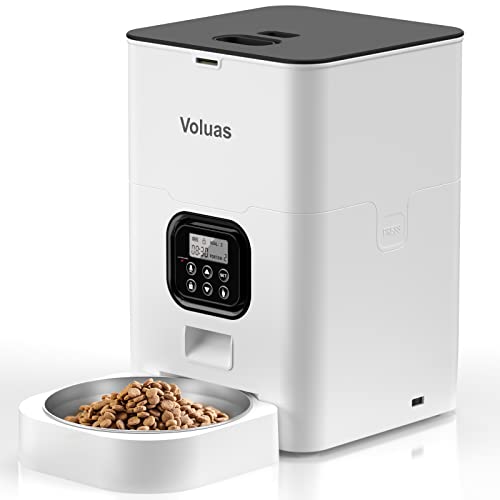
A manual automatic pet feeder is a bowl-and-hopper device that dispenses measured meals on a schedule, but it still relies on you to load the food, set the portions, and check the timer. In this guide, you will learn how to set one up correctly, program it for your pet’s routine, and avoid the mistakes that cause missed meals or wasted kibble. The steps apply to most timed feeders on the market, though you should always confirm details against your specific model’s manual.
What a Manual Automatic Pet Feeder Actually Does
The term can sound contradictory, so it helps to be clear about what the device does and does not handle. A manual automatic pet feeder stores food in a hopper, then releases a set amount into a bowl at times you choose. You do the work of filling the hopper, deciding how much each portion should weigh or measure, and confirming the clock is correct. The machine handles the repetitive release step.
Shopping for one? See our guide: 4 Best Automatic Pet Feeder PetSafe Models Compared (2026).
This split matters for daily use. Automation takes care of the 7 a.m. and 6 p.m. meals even when you are running late, but it cannot judge whether your cat is eating too quickly or whether your dog has stopped finishing dinner. Owners who understand this division tend to get the best results.
Before You Start: Tools and Supplies
Gather these items before you open the box so setup goes smoothly:
- The printed manual or a PDF copy from the manufacturer’s website
- A kitchen scale or the measuring scoop included with the feeder
- Your pet’s dry food, in the kibble size the feeder is rated for
- Fresh batteries or a working USB power source, depending on the model
- A flat, stable surface away from direct sun and heavy moisture
- A clean cloth and mild dish soap for the bowl and hopper
Many owners overlook the food type. Manufacturers typically specify a maximum kibble diameter, and oversized pieces can jam the release mechanism. Check the label before loading.
Step-by-Step Setup
Step 1: Unpack and Inspect the Parts
Remove all packaging, including any foam or tape inside the hopper and around the dispensing tray. Check that the lid seals, the bowl sits flush, and the power cord or battery compartment is intact. If a part is missing or cracked, contact the manufacturer before using the unit with your pet.
Step 2: Place the Feeder Correctly
Choose a level spot near an outlet if the model is plug-in, or somewhere you can reach the battery door easily. Keep it away from water bowls, since humidity can clump kibble and clog the chute. Measure the surface so the bowl has room to rotate or open if the design requires it.
Step 3: Set the Clock
Power the unit on and set the current time before any meal schedule. Feeders that use timers without a clock will drift or fail to trigger at the intended hour. Confirm AM and PM settings, since mixing them up is one of the most common programming errors.
Step 4: Load the Food
Pour kibble into the hopper, filling it no higher than the marked line. Overfilling can cause the rotating or sliding mechanism to stall. Replace the lid fully so it clicks or seals in place.
Step 5: Calibrate Portions
Run a test dispense and weigh what lands in the bowl. Most users find that the first dispense is inconsistent, so repeat the test two or three times before trusting the number. Adjust the portion setting until the output matches your target.
Step 6: Program the Meal Schedule
Enter each feeding time and the portion for that slot. Leave a buffer between meals so the device does not release two portions back to back. If your pet eats twice a day, two or three slots is usually enough. Multi-meal feeders can support more, but more slots mean more chances for a setting to be entered wrong.
Step 7: Run a Supervised Trial
Stay nearby during the first scheduled meal. Watch whether your pet approaches the bowl, whether the dispense sound is audible, and whether any kibble spills outside the bowl. Adjust placement or portion settings if anything looks off.
Portion Planning and Feeding Schedules
Automation is only as accurate as the numbers you give it. Start with the feeding guidelines printed on your pet food bag, then adjust for your animal’s weight, activity level, age, and any instructions from your veterinarian. Treat those bag guidelines as starting points rather than fixed targets.
| Pet Type | Typical Meal Frequency | Scheduling Note |
|---|---|---|
| Adult cat | 2 to 4 small meals | Spread meals so the cat does not wait too long between portions |
| Adult dog | 2 meals | Morning and evening meals work well for most routines |
| Puppy or kitten | 3 to 4 meals | Young animals need more frequent feeding; check with a vet |
| Senior pet | 2 to 3 meals | Appetite changes are a reason to contact a veterinarian |
Keep a simple log for the first two weeks. Note the time each portion dispenses, whether the bowl is empty by the next meal, and any changes in weight or stool. This record makes it much easier to adjust settings intelligently. Owners who want to compare feeder options side by side can review the 9 Best Manual Automatic Pet Feeder Options for Every Routine (2026) for model-by-model differences.
Troubleshooting Common Problems
The Feeder Does Not Dispense
Start with power. Replace batteries or confirm the outlet is live, then check that the clock and schedule are saved. If the unit still stays silent, look for a jammed chute and clear any kibble that is stuck in the mechanism. Clear it with the unit unplugged or the batteries removed.
Portions Are Uneven
Uneven output usually comes from mixed kibble sizes, damp food, or food dust clogging the wheel. Empty the hopper, wipe it dry, and refill with consistent kibble. If the problem persists, look up the troubleshooting section for your model. Guides such as Wopet Automatic Pet Feeder Manual: Setup, Programming and Troubleshooting Guide walk through similar fault patterns across brands.
Food Is Going Stale
Kibble left in a warm or humid hopper can lose freshness and attract pests. Limit the amount you load to what your pet will eat within a few days, and clean the hopper every week or two. Keep the feeder in a cool, dry room.
Your Pet Ignores the Bowl
Some animals need time to learn that the sound means food. Try placing a small amount of treat near the bowl during the first few dispenses. If your pet still refuses to eat, check for health concerns and consult a veterinarian rather than adjusting the schedule alone.
Common Mistakes
- Skipping the calibration test. Trusting the default portion setting often leads to over- or underfeeding.
- Mixing AM and PM. A meal scheduled for the wrong half of the day can shift the entire routine.
- Overfilling the hopper. Food pressed against the lid can jam the release.
- Ignoring the manual’s kibble size limits. Oversized pieces are a frequent cause of jams.
- Leaving wet food in the hopper. Moisture causes clumping, spoilage, and odor.
- Relying on the feeder for medical diets. Prescription or therapeutic diets should follow your veterinarian’s exact instructions.
Tips for a Reliable Routine
- Reweigh portions every few weeks, since pets change activity and appetite.
- Keep a backup bowl of fresh food for days when the feeder is out of service.
- Test the schedule after any power outage or battery change.
- Set a recurring reminder to clean the bowl and hopper.
- Store spare kibble in a sealed container, not in the hopper, if you will be away for several days.
If your pet is an active eater or a fast eater, a slow-feed accessory or a bowl with raised ridges may slow intake. Pair it with a feeder schedule that spaces meals evenly. For background on how timed feeders fit into a wider setup, the Automatic Pet Feeder Manual PDF: Where to Find It and How to Use It article explains how to locate official documentation when the paper copy is lost.
Recommended gear
These items support the feeding routine described above, though none replace the feeder’s own manual.
- Kitchen scale for portion checks. A digital kitchen scale lets you verify each dispense in grams, which is more accurate than eyeballing a scoop. View on Amazon
- Silicone food mat. A washable mat catches stray kibble and makes it easier to see spills after each dispense. View on Amazon
- Airtight food storage container. Keeping backup kibble sealed helps preserve freshness when you refill the hopper. View on Amazon
FAQ
What does “manual automatic” mean for a pet feeder?
It means the feeder dispenses food automatically on a schedule, but you still load the food, set the portions, and maintain the device. The automation covers the release, not the planning.
How do I know if the portions are accurate?
Run several test dispenses and weigh the output on a kitchen scale. Compare the average with your target portion and adjust the setting until the numbers match.
Can I use wet food in an automatic pet feeder?
Most automatic feeders are designed for dry kibble. Wet food spoils quickly and can clog the mechanism, so check your model’s manual before trying it. You may also like How to Set Up Wopet Automatic Pet Feeder: Step-by-Step Guide (2026).
What should I do if the feeder jams?
Unplug the unit or remove the batteries, then clear the blockage. Check whether the kibble is too large or too damp, and confirm you are not overfilling the hopper.
How often should I clean the feeder?
Wipe the bowl and hopper at least once a week with mild dish soap and water, rinse thoroughly, and dry completely before refilling. More frequent cleaning helps in humid climates.
Is an automatic feeder safe to leave on while I am away?
It can be useful for short absences, but you should confirm the schedule, portion size, and food supply before leaving. For longer trips or pets with health conditions, arrange for someone to check in and consult your veterinarian about feeding plans.
My pet is not eating from the feeder. What now?
Try placing a small amount of food near the bowl and observing your pet during dispensing. If appetite changes persist, contact a veterinarian, since loss of appetite can signal a health problem.
Do I need a special type of food?
Choose dry kibble that falls within the feeder’s stated size limits. Follow your veterinarian’s guidance for any prescription or specialty diet, and avoid mixing food types in the hopper.
Conclusion
A manual automatic pet feeder gives you consistent meal timing while keeping you in control of the food and portions. Set the clock, calibrate the output, and program a schedule that matches your pet’s needs. Review the log for the first few weeks and adjust as your pet’s weight and appetite change. For health-related feeding questions, always check with a veterinarian.
Related reading
- Wopet Automatic Pet Feeder User Manual: Step-by-Step Setup Guide
- Wopet Automatic Pet Feeder Manual Pdf: Setup and Program Steps
Ready to choose one?
About Ethan Brooks
Ethan Brooks is part of our editorial team and reviews and edits our everyday pet gear guides, checking product details against manufacturer specifications and owner feedback.