 By Ethan Brooks
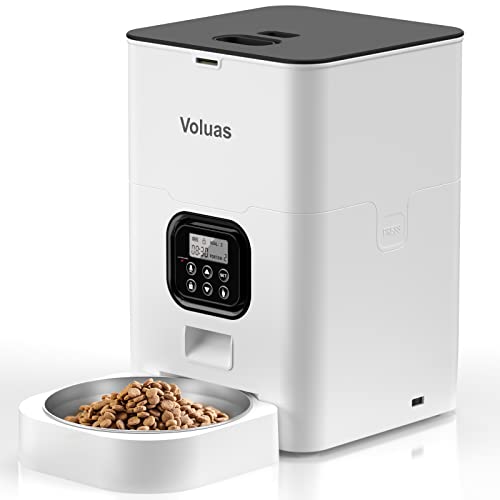
The Wopet automatic pet feeder user manual is the fastest route to a feeder that actually runs on schedule. This guide walks you through what the manual covers, how to unpack and place the unit, how to set the clock and program meal times and portions, and how to troubleshoot the problems owners most often run into. Because model details vary, always check the printed manual that came in your box against the steps below.
What the Wopet User Manual Covers
Most automatic feeder manuals follow the same general structure, and the Wopet guide is no exception. Expect sections on safety warnings, a parts list, assembly, power options, clock and program setup, portion control, and a troubleshooting table. Reading the whole thing once before you plug anything in saves time later, especially if you are feeding a dog that is already standing at the bowl waiting.
Shopping for one? See our guide: Wopet Automatic Pet Feeder Setup: 7 Best Picks Compared (2026).
Pay close attention to the safety section. It typically warns against exposing the power adapter to moisture, keeping the unit away from pets that chew cords, and never filling the food hopper with wet or sticky food. Manufacturers also specify that the feeder should not be used as a substitute for supervised feeding for pets with medical conditions, so if your animal is on a prescription diet, confirm the portion plan with your veterinarian.
Before You Start: Tools and Checklist
You will not need special tools for most Wopet setups, but having the right items on hand keeps the process smooth. Gather these before you open the box:
- A flat, stable surface near an outlet, such as a kitchen counter or utility shelf
- The included power adapter and any batteries listed in the manual (usually alkaline D or AA, depending on model)
- A measuring cup or kitchen scale for checking portions
- Your pet’s current food, in dry kibble form, which is what the feeder is designed to dispense
- A small notepad to record your meal schedule before you enter it into the unit
Write down your target feeding times and daily portions first. Trying to decide on the fly while the buttons are blinking is a common source of mistakes.
Step-by-Step: Unpacking and Physical Setup
Step 1: Inspect the Parts
Compare the contents against the parts list in the manual. Typical items include the hopper lid, food tray or bowl, the feeding mechanism, the power adapter, and sometimes a stainless steel bowl insert. If a part is missing or cracked, contact the seller before assembling, since a damaged lid can let moisture into the mechanism.
Step 2: Assemble the Hopper and Bowl
Follow the diagram in the manual to seat the food tray and attach the hopper. Most users find that the lid clicks into place with a firm press; if it does not seat fully, the unit may not start. Wipe all contact surfaces dry before assembly.
Step 3: Choose the Placement
Set the feeder on a level surface that is out of direct sunlight and away from the water bowl. Keep it at least a few inches from walls so the tray can rotate or drop freely. Avoid placing it on carpet, where kibble can jam the outlet.
Step 4: Connect Power
Plug the adapter into a wall outlet and route the cord so the pet cannot reach it. If the manual allows battery backup, install fresh batteries and check the polarity markings. Batteries typically keep the clock and stored program running during a power outage, but they do not usually power the motor for a full feeding cycle, so confirm that detail in your manual.
Setting the Clock and Programming Meals
Step 5: Set the Current Time
Use the menu buttons to enter the current hour and minute. Set the clock to 24-hour or 12-hour format as the manual directs. A wrong clock means meals will run at the wrong times, so verify it against your phone before moving on.
Step 6: Program Feeding Times
Most Wopet programming follows a pattern: select a meal slot, enter the time, then enter the portion. Many owners find that two meals per day works well for adult dogs and cats, with the portion split roughly in half. Keep the gaps between meals reasonable, and avoid scheduling a meal immediately after vigorous exercise.
Step 7: Set Portion Sizes
Portion settings are usually expressed in cups or in turns of the feeding wheel, depending on model. Check your manual for the exact unit. To calibrate, run a manual test feed, weigh or measure what comes out, and adjust. Repeat until the output matches your target. Your veterinarian or the food bag feeding guide is the right source for the daily total.
Step 8: Run a Test Feed
Use the manual or test button to dispense one portion. Confirm the kibble drops cleanly into the bowl and that nothing jams. Listen for grinding or repeated clicking, which can signal a stuck piece. Do not let the pet eat from the unit until the test is clean.
Portion Accuracy: A Quick Reference
Feeders dispense by volume, not by weight, so kibble density matters. Use this table as a rough starting point, then confirm with your food label and vet.
| Pet Type | Typical Meals Per Day | How to Split Daily Portion | Check Method |
|---|---|---|---|
| Adult dog | 2 | Equal halves | Weigh one test portion on a kitchen scale |
| Adult cat | 2 to 4 | Smaller, more frequent portions | Measure with a standard cup |
| Puppy or kitten | 3 to 4 | Follow vet or label guidance | Recheck weekly as the pet grows |
| Senior or diet-restricted pet | As directed by vet | Vet-prescribed split | Verify before every change |
Troubleshooting Common Problems
When something goes wrong, the manual’s troubleshooting section is the first stop. Owners frequently report these issues:
- Feeder does not turn on: Check that the adapter is fully seated and the outlet is live. Replace batteries if the display is dim.
- Clock keeps resetting: Batteries may be dead or missing. Install fresh ones and reset the time.
- Food is jamming: Remove the hopper, clear any clumps, and confirm the food is dry kibble. Avoid mixing sizes.
- Meals run at the wrong time: Recheck the clock and the AM/PM setting before reprogramming.
- Portions are too small or large: Re-run a calibration test and adjust the portion setting.
If a fault persists after resetting, contact the manufacturer’s support line listed in the manual rather than opening the housing yourself.
Tips for Getting the Most From Your Feeder
Begin with a small trial. Run the feeder alongside your normal feeding for two or three days so you can see how the pet responds before cutting back on hand-feeding. Keep a simple log of meal times and any missed or short portions, which helps when you troubleshoot. Clean the hopper and bowl weekly with warm water and mild soap, dry them completely, and reassemble before refilling. Store food in a sealed container so kibble stays fresh and the feeder mechanism stays clear.
Common Mistakes to Avoid
- Skipping the clock check, which leads to meals running at the wrong times
- Filling the hopper with wet food or treats that are too large for the mechanism
- Setting portions by guesswork instead of running a calibration test
- Leaving the cord where a chewing pet can reach it
- Forgetting to update portions as a pet gains or loses weight
- Using the feeder for a pet on a medical diet without veterinary input
Recommended Gear
A few accessories make daily use easier and help you keep portions consistent.
- Digital kitchen scale: Lets you weigh test portions accurately, which is more reliable than eyeballing a cup. View on Amazon
- Stainless steel pet food storage container: Keeps kibble sealed and fresh between refills. View on Amazon
- Silicone pet bowl mat: Catches spilled kibble and protects the floor around the feeder. View on Amazon
FAQ
Where can I find the Wopet automatic pet feeder user manual?
The printed manual is included in the box. Many owners also find the manual on the manufacturer’s website or through the product listing. Match the model number on the feeder to the manual version before following the steps.
How do I reset the Wopet feeder?
Most units reset by removing power and batteries for a short period, then restoring them. Check the troubleshooting section of your manual for the exact reset procedure, since some models have a dedicated reset button.
Does the feeder work during a power outage?
Battery backup usually keeps the clock and saved program intact. Many feeders cannot run a full motor cycle on batteries alone, so confirm the behavior in your manual before relying on it.
How do I know the portion size is right?
Run a test feed, weigh the output, and compare it to the daily total on your food label or from your veterinarian. Recheck every few weeks, and after any change in weight or activity.
Can I use wet food in the feeder?
Most automatic feeders are designed for dry kibble. Wet food can spoil in the hopper and clog the mechanism. Check the manual’s food guidelines first.
What should I do if my pet refuses the feeder?
Some pets need time to adjust. Place a small amount of food on the tray by hand, let the pet investigate, and gradually increase the automated portion. If refusal continues, a veterinarian can rule out appetite or health concerns.
How often should I clean the feeder?
Wipe down the bowl and hopper weekly, and clean more often in humid conditions. Always dry all parts fully before reassembly.
Is the feeder safe for every pet?
Automatic feeders suit many dogs and cats, but pets with medical conditions, dietary restrictions, or feeding-related health issues should only use one under veterinary guidance.
Conclusion
Working through the Wopet automatic pet feeder user manual carefully pays off: a correct clock, calibrated portions, and a clean test feed prevent most problems before they start. Keep your meal log, clean the unit regularly, and revisit portion settings as your pet changes. When in doubt about diet or health, consult your veterinarian before adjusting the schedule.
Related reading
- Wopet Automatic Pet Feeder Manual: Setup, Programming and Troubleshooting Guide
- Wopet Automatic Pet Feeder Manual Pdf: Setup and Program Steps
- Pitpet Automatic Pet Feeder Manual: Setup, Programming and Troubleshooting Steps
- Petmate Automatic Pet Feeder Manual: A Practical Guide (2026)
- Pet Ultra Automatic Feeder Manual: Setup, Programming and Troubleshooting Steps
Ready to choose one?
About Ethan Brooks
Ethan Brooks is part of our editorial team and reviews and edits our everyday pet gear guides, checking product details against manufacturer specifications and owner feedback.