 By Ethan Brooks
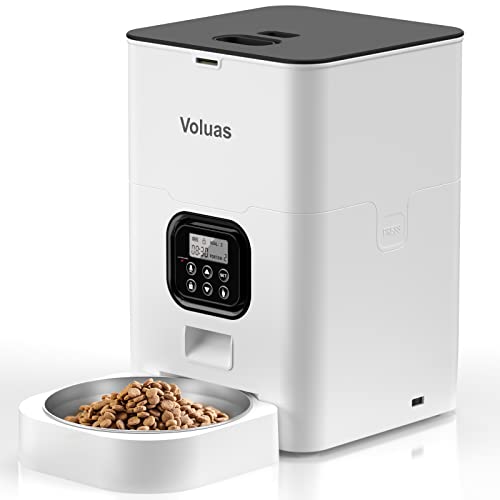
A surdy automatic pet feeder that stops dispensing, jams, or drops the wrong portion usually has one of a few causes: a food-size mismatch, a clogged dispensing path, a timer or power problem, or a portion setting that doesn’t match the kitchen scale. Most of these can be fixed in under 15 minutes without replacing the unit. Start with the power and the food, then check the schedule.
Why a Surdy Automatic Pet Feeder Stops Working
When an automatic feeder fails, owners often assume the motor has died. In practice, the motor is rarely the problem. Most complaints come from the food path, the power supply, or the programming. Owners often report that the unit runs normally for weeks and then suddenly misbehaves after a bag switch, a humid week, or a power flicker that reset the clock.
Shopping for one? See our guide: Automatic Pet Feeder Petsafe (2026): Pros, Cons & Verdict.
Because the surdy automatic pet feeder is a daily-use device, small issues compound. A little kibble dust collects in the hopper, a slightly wrong portion gets repeated twice a day, and within a week the pet is either overfed or hungry. Catching the cause early saves both the food and the routine.
The Main Factors Behind Feeding Problems
Kibble size and shape
Feeders are calibrated for a specific kibble range. Very large kibble can wedge in the outlet, while small, irregular pieces or crumbled food can bridge across the opening. Manufacturers generally specify a kibble diameter range in the manual. If your food falls outside it, expect inconsistent portions even when everything else is correct.
Moisture and humidity
Dry food that absorbs moisture swells slightly and clumps. Treats, wet food mixed into dry food, and fatty coatings all make the hopper sticky. A kitchen near a dishwasher or a room with high humidity is a common culprit for jams that appear only in summer.
Power and clock settings
A power interruption can reset the internal clock, which shifts or erases scheduled meals. Battery backup, where the model has it, keeps the schedule through short outages, but batteries that are low or missing can cause the unit to lose its program. Check the display time first whenever meals seem off.
Portion calibration
Portion settings are usually expressed in cups, grams, or preset counts. These are estimates based on the manufacturer’s test food. If your food is denser or lighter, the actual weight per portion will differ. Weigh a few portions on a kitchen scale and compare them with the setting.
What to Do About It
- Unplug the unit and check that the power adapter is seated firmly. Confirm the display shows the correct time.
- Empty the hopper and remove any stuck kibble from the outlet and the dispensing tray. Wipe away dust and fat residue with a dry cloth.
- Check that the kibble fits the size range in the manual. If it doesn’t, switch food or use a smaller, uniform kibble for the feeder.
- Run a test dispense and weigh the output. Adjust the portion setting until the weight matches your target.
- Reprogram the schedule after any power outage, and recheck it after a week to confirm meals are landing at the right times.
- Store food in a sealed container away from humidity, and avoid mixing wet food into the hopper.
If the feeder still jams after cleaning and resizing, or if the motor makes grinding noises, stop using it and contact the manufacturer. For pets with medical conditions or strict dietary needs, confirm portion sizes with your veterinarian before relying on automated dispensing.
What We’d Use
If you want a feeder with a proven track record for scheduled portions, consider the PetSafe Smart Feed 2.0, which many owners use for consistent multi-meal routines. View on Amazon
For households that want a feeder with a built-in backup power option, the Petmate Pet Mate Programmable Feeder is a frequently mentioned choice among owners who prioritize clock retention. View on Amazon
For readers comparing models before buying, our guides on Wopet Automatic Pet Feeder Setup: 7 Best Picks Compared (2026) and Wopet Automatic Pet Feeder Manual: Setup, Programming and Troubleshooting Guide walk through programming and troubleshooting in more detail, and Voluas Automatic Pet Feeder Portion Size Chart: How to Set Portions (2026) explains how to match portion settings to real food weights.
Related Questions
How do I know if my feeder is dispensing the right amount?
Dispense three to five portions into a bowl, weigh them, and divide by the number of portions. Compare the average to your target weight from your vet or the food label.
Why did my feeder skip a meal?
The most common reasons are a reset clock after a power outage, a jam in the outlet, or a schedule set to the wrong AM/PM. Check the display and the program before assuming a hardware fault.
Can I use wet food in an automatic feeder?
Most automatic feeders are designed for dry kibble only. Wet food spoils quickly and can clog the mechanism, so use a feeder made for wet food or serve it by hand.
How often should I clean the feeder?
Wipe the hopper and dispensing path at least once a week, and deep clean monthly. Frequent cleaning prevents fat and dust buildup that leads to jams.
Ready to choose one?
About Ethan Brooks
Ethan Brooks is part of our editorial team and reviews and edits our everyday pet gear guides, checking product details against manufacturer specifications and owner feedback.