 By Ethan Brooks
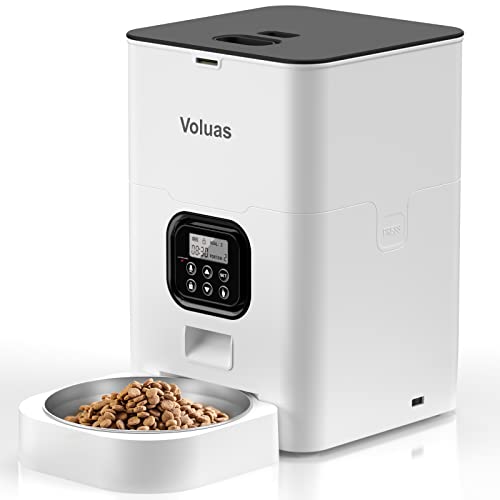
The petlibro space automatic pet feeder is a timed, portion-controlled dry food dispenser built for owners who want consistent meals while they are at work, traveling or running errands. This guide explains what the feeder does, how to set it up and program meal times, how to dial in portions that match your pet’s needs, and which mistakes to avoid. By the end, you should know whether this type of feeder fits your routine and how to get it running correctly on day one.
What the petlibro space automatic pet feeder does
At its core, an automatic pet feeder stores dry kibble in a hopper and releases set amounts at scheduled times. The petlibro space automatic pet feeder follows that same basic model: you load food, set a schedule, choose a portion for each meal, and the unit handles the rest. Manufacturers generally describe this line as suited to cats and small-to-medium dogs eating dry food, though you should check the official specifications for your exact model before buying.
Think of it as a tool for consistency rather than a replacement for attention. It keeps meals on time when your schedule shifts, but it cannot tell whether your pet is eating, feeling well or getting enough water. That distinction shapes everything else in this guide.
Before you start: what to check and gather
Before unboxing, take a few minutes to plan. A feeder works best when it is placed on a stable, level surface, away from direct sun and heat sources, and within reach of a power outlet if your model uses one. Confirm whether your unit runs on mains power, batteries or both, since battery backup matters if you lose power during a storm or a long absence.
Gather these items:
- Your pet’s current dry food and the bag’s feeding guidelines
- A kitchen scale or measuring cup for accurate portions
- A clean, dry surface for the feeder, ideally with some clearance around it
- Your pet’s meal times, based on your normal daily routine
- Your veterinarian’s recommended daily calorie or food amount, if you have one
Step-by-step setup guide
Step 1: Assemble and position the unit
Follow the manufacturer’s assembly instructions and confirm all parts lock into place. Place the feeder on a level surface where your pet can reach the bowl comfortably but where it will not be knocked over by a jumping dog or a cat batting at the hopper. Keep it away from water bowls, since moisture can clump kibble and reduce flow.
Step 2: Load the food correctly
Fill the hopper with dry kibble only. Wet food, treats larger than the dispensing opening and loose powders can jam the mechanism. Fill it in stages if your model has a narrow opening, and check that pieces are not stuck in the chute before you run the first cycle.
Step 3: Set the clock and meal schedule
Set the current time first, because every scheduled meal depends on it. Then enter one time per meal. Most owners find that splitting daily food into two or three meals fits best for adult pets, while puppies and kittens often need more frequent feedings. Ask your veterinarian for the right meal count for your pet’s age and health.
Step 4: Program portion sizes
Portion settings usually refer to a fixed amount of kibble per meal, often expressed in grams or as a measured unit. Weigh a sample portion on your kitchen scale, then match it to the feeder’s setting. Do not guess. A typical error is assuming a measuring cup equals the feeder’s setting without checking.
| Daily food needed | Meals per day | Approximate portion per meal |
|---|---|---|
| 150 g | 2 | 75 g |
| 150 g | 3 | 50 g |
| 200 g | 2 | 100 g |
| 200 g | 3 | about 67 g |
The table is a simple math example, not a feeding recommendation. Your pet’s actual daily amount depends on body weight, activity level, age and the food’s calorie density. Always start from the bag guidelines and your vet’s advice.
Step 5: Run a test cycle
Before you leave the house, trigger a manual dispense or wait for the first scheduled meal while you are nearby. Confirm the correct amount falls into the bowl, the mechanism runs smoothly and no kibble is stuck. Watch your pet’s first few meals closely so you know they are accepting the feeder.
Step 6: Train your pet to use it
Some pets are cautious around new objects. Start by placing a few pieces of their regular kibble around the base or at the bowl while the feeder is off. Once they approach it calmly, run a short cycle so they associate the sound with food. Avoid forcing your pet close to the unit, since fear can lead to skipped meals.
Portion control and feeding routines
Good portioning matters more than the feeder itself. Automatic dispensing does not know if your dog is gaining weight or your cat is leaving food behind. Weigh your pet every few weeks, watch body condition, and adjust portions in small steps, usually no more than about 10 percent at a time, unless your vet directs otherwise.
If your pet is on a prescription or therapeutic diet, check with your veterinarian before using any automatic feeder, because timing and portion changes can affect treatment.
For more on setting exact portions, see Voluas Automatic Pet Feeder Portion Size Chart: How to Set Portions (2026), which walks through the same weighing and conversion logic. If you are comparing feeders with different programming approaches, PetLibro Air Automatic Pet Feeder Review: Features and Performance offers a useful reference point for how this brand family handles scheduling.
Troubleshooting and maintenance
Most problems fall into a few categories. Jammed kibble usually comes from oversized pieces or moisture. Missed meals often come from a clock error or a dead battery. Uneven portions may point to a dirty chute or food that has absorbed humidity. Clean the hopper and dispensing path regularly with a dry cloth, and store food in a sealed container to keep it dry and fresh.
Check the owner’s manual for model-specific reset steps, since button sequences differ between versions. If you cannot resolve a fault, contact the manufacturer’s support team rather than forcing the mechanism, which can damage the motor.
Common mistakes
- Skipping the test cycle. Discovering a jam at the first missed meal is avoidable.
- Using the wrong food shape. Irregular or oversized kibble can block the chute.
- Relying on the feeder as your only check. Watch your pet’s appetite, weight and stool quality.
- Letting food get damp. Humidity leads to clumping and spoilage.
- Setting the clock wrong after a power outage. Confirm the time after any power interruption.
- Making big portion jumps. Adjust gradually, and recheck body condition.
Tips for getting the most from your feeder
- Pair the feeder with a regular daily routine so meal times feel predictable to your pet.
- Keep a simple log of meal times, portions and any refused meals for the first two weeks.
- Store a backup manual feeding plan in case the unit stops working.
- Clean the hopper on a fixed schedule, such as every week or two.
- Re-weigh your pet monthly and update the portion setting if their weight changes.
Recommended gear
A few accessories can make setup and daily use smoother:
- A digital kitchen scale for weighing kibble and checking portions accurately. View on Amazon
- An airtight food storage container to keep kibble dry and fresh between refills. View on Amazon
- A non-slip feeding mat to catch spills and keep the area clean. View on Amazon
FAQ
Can the petlibro space automatic pet feeder handle wet food?
Automatic dry food feeders are generally designed for kibble. Wet food can spoil in the hopper and clog the mechanism. Check the manufacturer’s guidance for your exact model before using anything other than dry food.
How do I know the right portion size?
Start with the feeding guidelines on your food bag and your veterinarian’s recommendation. Weigh a sample portion, then match the feeder’s setting to that weight.
What should I do if the feeder misses a meal?
Check the clock setting first, then confirm the schedule, power source and battery level. Clear any jammed kibble and run a manual test cycle.
How often should I clean the feeder?
Wipe the hopper and chute regularly, typically every week or two, depending on how humid your home is and how often you refill.
Is an automatic feeder safe for cats and dogs?
Many owners use them for both species, but suitability depends on your pet’s size, eating habits and health. Consult your veterinarian before relying on automatic feeding, especially for pets with medical conditions.
Can I leave my pet alone for a full day with this feeder?
Some pets can handle a day of scheduled meals, but water access matters too. Provide fresh water and confirm your pet’s needs with your veterinarian before extended absences.
What if my pet refuses to eat from the feeder?
Go back to the training steps, use a few pieces of familiar food to build trust, and avoid forcing contact. If refusal continues, ask your veterinarian to rule out health issues.
Conclusion
The petlibro space automatic pet feeder can keep meals consistent when your schedule gets busy, as long as you set it up carefully and verify portions. Test every cycle, weigh your pet regularly and keep the hopper clean and dry. Treat the feeder as a helpful tool, not a substitute for daily observation, and check with your veterinarian about any feeding changes.
Related reading
- 7 Best Petlibro Easy Feed 4L Automatic Pet Feeder Alternatives and Picks (2026)
- Wopet Automatic Pet Feeder with Camera: 5 Best Picks Compared (2026)
- Wopet Automatic Pet Feeder User Manual: Step-by-Step Setup Guide
Ready to choose one?
About Ethan Brooks
Ethan Brooks is part of our editorial team and reviews and edits our everyday pet gear guides, checking product details against manufacturer specifications and owner feedback.