 By Ethan Brooks
Getting the pet ultra automatic feeder portion size right comes down to three things: knowing how much your pet should eat each day, dividing that amount into the right number of meals, and checking that the feeder actually dispenses what you programmed. This guide walks through each step so you can set portions that match your pet’s body weight, activity level and feeding schedule, and confirm them with a simple test.
Why Portion Size Matters More Than the Feeder Itself
An automatic feeder only does what you tell it to do. If the portion is too large, your pet gains weight, and if it is too small, your pet may lose condition or beg constantly between meals. Many owners assume the feeder’s dispensing mechanism handles the math, but the dispenser simply releases a set amount of food per cycle. The accuracy of your meal plan depends on the numbers you enter.
Shopping for one? See our guide: 8 Best Voluas Automatic Pet Feeder Portion Size Options Compared.
Before adjusting anything on the device, look at your pet’s current routine. How many times a day do they eat? Do they finish quickly, or do they leave food in the bowl? Those observations will help you check your numbers after the first few days.
Step 1: Estimate Your Pet’s Daily Calorie Needs
Most veterinary guidance starts with resting energy requirement (RER), which is calculated from body weight. A common formula is RER = 70 × (body weight in kg)^0.75. From there, multiply RER by an activity factor to estimate daily needs. The exact factor depends on your pet’s age, whether they are spayed or neutered, and how active they are. Your veterinarian can confirm the right multiplier, especially for puppies, kittens, seniors or pets with medical conditions.
Once you have a daily calorie target, read the calorie content on your pet food bag. It is usually listed as kcal per cup or kcal per kilogram. Divide your daily calorie target by the food’s calories per cup to get the total cups per day.
Worked Example
Suppose a neutered adult dog weighs 10 kg. RER is 70 × 10^0.75, which is roughly 247 kcal. If your veterinarian suggests a maintenance multiplier near 1.6 for this dog, the daily target is about 395 kcal. If the food contains 350 kcal per cup, the dog needs roughly 1.1 cups per day. Always confirm numbers like these with your vet, since the right figure varies from pet to pet.
Step 2: Convert Daily Amount Into Feeder Portions
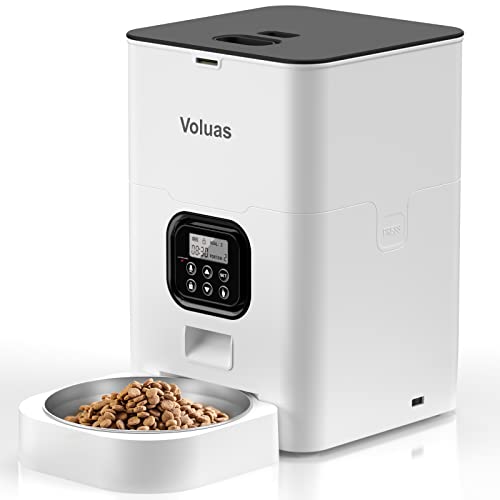
Automatic feeders usually dispense food in fixed increments, often measured in grams or as a number of “portions” per cycle. Check your device’s manual to find out how much one portion releases. Then divide your daily total by the number of meals you plan to schedule.
- Convert your daily cup or gram target into grams, using the food bag’s measuring guide if needed.
- Decide how many meals per day to schedule. Two to three meals suit most adult dogs and cats, while many puppies and kittens need three to four.
- Divide the daily total by the number of meals.
- Round to the nearest portion increment your feeder can dispense.
- Enter the value for each scheduled time in the feeder’s programming menu.
Quick Conversion Reference
| Pet Type | Typical Meals Per Day | Portion Approach |
|---|---|---|
| Adult cat | 2 to 4 small meals | Split daily total evenly or slightly larger at night |
| Adult dog | 2 meals | Equal split, morning and evening |
| Puppy or kitten | 3 to 4 meals | Smaller, more frequent portions as they grow |
| Senior pet | 2 to 3 meals | Adjust based on weight checks and vet guidance |
Step 3: Account for Treats and Table Food
Treats count toward daily calories. A common guideline is that treats should make up no more than about 10 percent of daily intake. If you give regular training rewards or chews, subtract those calories from the feeder portions so your pet is not overfed. Keep in mind that a single lick of peanut butter or a small piece of cheese can add a meaningful number of calories for a small cat.
Step 4: Program and Test the Feeder
After entering your numbers, run a test before you leave the house for a full day. Set the feeder to dispense one portion at a set time, then weigh the output on a kitchen scale. If the dispensed amount differs from the programmed value, check whether the food kibble size is causing jams or whether the portion setting needs adjustment. Different food shapes can change how much fits into each dispense cycle, so testing with your actual food matters.
Once you confirm accuracy, observe your pet for the first week. A healthy adult should maintain steady body weight, have a regular stool pattern and show consistent energy. Use a body condition chart or a weekly weigh-in to track progress.
Step 5: Adjust Portions Over Time
Portion size is not a fixed setting. Adjust it when your pet’s weight changes, when activity levels shift, or when they move into a new life stage. Make small changes, typically around 5 to 10 percent at a time, and recheck weight after two to three weeks. Sudden large changes can upset digestion.
Common Mistakes to Avoid
- Using the bag’s feeding chart without adjusting. Feeding guides on food packaging are general starting points, and many pets need less.
- Forgetting to recalculate after switching foods. Different brands have different calorie densities, so the same cup can mean very different calories.
- Ignoring treats and table scraps. These quietly add up across a week.
- Skipping the dispense test. Kibble shape and size can change actual portion output.
- Making big changes at once. Abrupt shifts can cause digestive upset and make it hard to tell what is working.
- Relying only on the feeder’s display. Verify with a scale, since the setting is only as good as the output.
Tips for Reliable Portions
- Keep the food hopper dry and refill it with the same brand you used during calibration.
- Clean the dispensing chamber regularly so crumbs and dust do not affect portion accuracy.
- Check batteries or backup power on a schedule, since a power interruption can change feeding times.
- Write down your daily target, number of meals and portion value somewhere you can find them, such as a note on your phone.
- Review your pet’s weight every two to four weeks during the first few months.
Recommended gear
A digital kitchen scale helps you verify that each dispensed portion matches your programmed amount. Look for one that measures in grams and has a tare function so you can weigh the bowl or collection cup separately.
A measuring cup marked in both cups and milliliters makes it easier to convert your food bag’s recommendations into the units your feeder uses. View on Amazon
A pet weight scale, either a bathroom scale you can use while holding the pet or a platform scale designed for animals, lets you track changes over time. View on Amazon
A food storage container with an airtight lid keeps kibble fresh and consistent in shape and moisture, which helps keep portion output steady day to day. View on Amazon
For more on setting up and programming, see Pet Ultra Automatic Feeder Manual: Setup, Programming and Troubleshooting Steps and Pet Ultra Automatic Feeder Review: Features and Performance. If you are comparing feeders with different portion settings, 6 Best Automatic Pet Feeder Portion Size Options for Every Routine (2026) covers how each handles meal sizes. For a broader overview of timers and backup power, see Automatic Pet Feeders: Timers, Portions and Backup Power.
FAQ
How do I know if the portion size is right for my pet?
Check body condition every week. You should be able to feel the ribs without pressing hard, and see a waist when looking from above. If your pet gains or loses weight steadily, adjust the portion by a small amount and recheck.
Should I feed the same portion every meal?
In most cases, yes, since splitting the daily total evenly is simple and predictable. Some cats do better with a slightly larger evening meal, and your veterinarian can advise if a different split makes sense for your pet.
Why does the feeder dispense a different amount than I set?
The most common reasons are kibble size and shape, humidity causing clumping, and a partially blocked dispensing chamber. Weigh a test dispense and clean the chamber, then retest with the food you actually use.
Can I use the feeding guide on the food bag?
It is a useful starting point, but those guides are general. Many pets are overfed by following them exactly. Compare the bag guide with your calculated daily target and with your pet’s actual weight trend.
How often should I recalculate portions?
Recalculate whenever your pet’s weight changes noticeably, when you switch foods, or when they move into a new life stage such as puppyhood, adulthood or seniority. A routine check every few months is also a good habit.
Do treats need to be included in the portion plan?
Yes. Treats contribute calories, so subtract them from the feeder portions to keep total intake on target. Keep treats to roughly 10 percent of daily calories or less.
What if my pet is underweight or overweight?
Consult a veterinarian before making major changes. Weight problems can have medical causes, and a professional can set a safe calorie target and a plan for gradual adjustment.
Is it safe to change portions quickly to lose weight?
Avoid rapid changes. Reduce portions gradually, usually in steps of about 5 to 10 percent, and monitor weight and energy. Ask your veterinarian for a weight loss plan if your pet needs more than a small adjustment.
Conclusion
Setting an accurate pet ultra automatic feeder portion size takes a few calculations, a simple dispense test and regular weight checks. Start with your pet’s calorie needs, divide the daily total into sensible meals, and confirm the output on a scale. Adjust gradually as your pet changes, and check with your veterinarian whenever you are unsure.
Ready to choose one?
About Ethan Brooks
Ethan Brooks is part of our editorial team and reviews and edits our everyday pet gear guides, checking product details against manufacturer specifications and owner feedback.